





My Pocket Pension, engaging members with their pensions
Give members more control over their pension and free admins to focus on the work that matters most. Easier for members, smarter for admins — all powered by Mantle’s award-winning My Pocket Pension app.
Keep reading to discover:
→ What to expect in the new My Pocket Pension app
→ Benefits of pension app for admins and members
→ Key features of My Pocket Pension app
My Pocket Pension has been upgraded!
Easier for members. Smarter for admins.
Mantle’s award-winning My Pocket Pension app has recently been upgraded!
The new version has been designed to make managing and understanding pensions simpler for everyone. As a member, you’ll notice a cleaner, more modern look, easier navigation, and clearer information across both phone and web applications.
Behind the scenes, the platform has also been rebuilt to improve accessibility and support future enhancements. Thus, it’s not just an upgrade for today, but a foundation for what’s coming next.
The best part? You don’t need to do anything! You’ll continue to access My Pocket Pension in the same trusted way, with no disruption and no need to re-register.
What is a pension app?
Managing a pension plan can be overwhelming. Proactive management of new and existing pensions helps you to properly prepare for retired life and easily access your money when the time comes. Using an app as a place to track and manage a pension account allows you to do all of this admin work from your smartphone.
Placing these crucial services in one account via the phone app means that you can log in at any time, check in on your pension plan, update or add any other personal information you may need, and know that your money is being held securely for access in your retirement.
Experience shows that most people now access services from their smartphones. That’s why we developed the award winning My Pocket Pension, Mantle’s pension smartphone app. My Pocket Pension is designed to be easy to access, use, and understand.
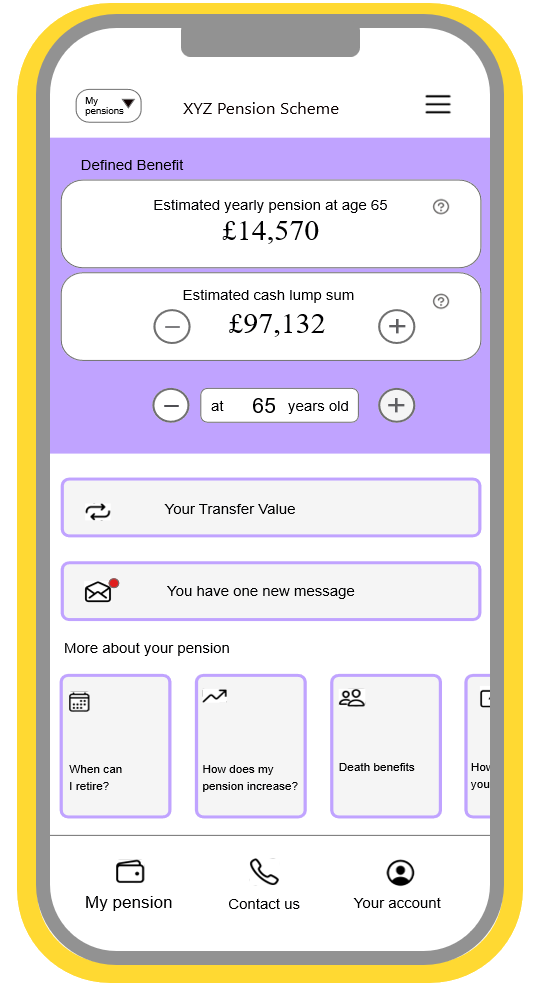
Once registered, a member can easily:
- View pension and cash from 55-75
- View a live transfer value
- Understand what happens on death
- Review personal details and keep them up to date
- View documents
- Pensioners can view their next payment plus payslips and P60s
What to expect in the new My Pocket Pension app
We’ve made a range of improvements to help you get more from My Pocket Pension, whether you’re supporting members or managing your own pension.
A simpler, more modern design
A cleaner interface with clearer layouts, making it easier to read, understand, and use.
Easier navigation
Improved navigation helps you find key information quickly and complete tasks with less effort.
Improved accessibility
To support a more inclusive experience, the new mobile app will meet AA accessibility standards (the web app already meets these requirements).
Faster, more secure login
Biometric login, including fingerprint and face ID, will be available on supported devices for quicker, more convenient and secure access.
More focused content
The TV section has been streamlined to highlight the most useful content.
Built for the future
My Pocket Pension has been upgraded in a way that allows us to continue improving with enhancements and new features over time.
What does this mean for me?
The transition will be entirely seamless! There’s nothing you need to do. If you use the mobile app, it will update automatically (if enabled). If you access via web, just continue using your usual link.
No disruption, no need to re-register, just My Pocket Pension you’ve loved and trusted!
Watch the preview of the new My Pocket Pension below
What are the benefits of a pension account app?
While you can find all the information you wish to know about your pension when you visit our web version, Mantle’s My Pocket Pension app offers a much easier solution that delivers benefits to both members themselves and the admins running your pension schemes.

Benefits of My Pocket Pension App for Admins
Spend less time answering member queries directly.
- Reduce admin time as members can manage their own personal details
- Manage everything through Mantle’s unified, intelligent pension platform
- Resolve member queries quickly with secure SMS messaging
Benefits of My Pocket Pension App for Members
Know exactly what you’ll receive at retirement.
- Quick and easy registration using a personalised QR code, all you need is your National Insurance number (NINO) and your phone
- Easy download for Android devices via Google Play and Apple devices via the App Store
- Peace of mind knowing all personal data is protected by the latest security
- Access your account anytime via the web app using the same secure PIN and biometric login, including fingerprint and face ID
Mantle for members
A new way to engage and support your pension scheme members










Streamlined onboarding
Simple registration process, encourages adoption and usage.

Anywhere access
Easy to access, view pension details anytime, anywhere.

Real time benefits
Pension, cash and transfer value refreshed daily.

Easy to update
Easily update and maintain your personal details.
Features
Key Features of Mantle’s My Pocket Pension App

Verify details and register in <1 minute
Scan your personalised QR code and download the app from your smartphone’s app store. Once installed, open the app and scan your unique QR code again. The app will prompt you for your NI number, and will then ask you to select a 4-digit PIN for future access. No password or username needed.

Up to date transfer values
Transfer values on My Pocket Pension are automatically refreshed daily, making it easy for the member to view their details and saving strain on the administrator.

All the information you need
My Pocket Pension makes the complexity understandable including a simple presentation of the Scheme’s rules. Members have instant access to all their pension-related documentation including scheme and personal documents, payslips, and P60s.

Easy to communicate
SMS messaging engages the members and enables seamless, secure communication between members and administrators. Messages can be sent in bulk or at an individual level.
1 minute
Time it takes to register for My Pocket Pension
92%
of pilot users chose to use the app vs the web app
93%
of pilot users rated overall useability of MPP as 4 out of 5

87%
of pilot users rated ease of checking benefits 4 out of 5
Our Customers


The PSPA is delighted to announce that its new Mantle Services system is now live. From procurement to implementation, the service and support from the Mantle team has been impeccable. The team where personable and knowledgeable and have worked exceedingly hard with the PSPA project team to deliver the system on time. For the PSPA, Mantle is simply revolutionary. As well as providing a secure and efficient digital solution to enable the PSPA to be more agile and cost effective in carrying out its management and administration duties, it will provide public servants with immediate engagement with their valuable pension benefits into the future. Going digital will see the PSPA supporting the Isle of Man, to meet its environmental obligations by facilitating flexible working solutions for staff and reduced paper and energy consumption.


It’s been a pleasure working with the Mantle team and I’ve been impressed with their knowledge, expertise and enthusiasm for working with Utmost to develop a market leading actuarial and data platform to serve the bulk annuity market. I firmly believe that the end-product will truly set us apart in the market and provide a seamless journey to both Trustees and their scheme members.


Our partnership with Mantle, is a key part of our successful entry into the BPA market, allowing us to provide an attractive BPA proposition and to deliver excellent customer service.
Want to find out more about how Mantle’s My Pocket Pension works?
No email required
Frequently Asked Questions About My Pocket Pension
1. When did the updated version of My Pocket Pension launch?
The updated version of My Pocket Pension launched in early June 2026.
2. What’s new that users should be aware of?
The redesigned app features a simpler, more accessible interface that meets AA standards and lays the groundwork for future enhancements.
3. Will existing users need to re-register?
No, existing users won’t need to re-register. The transition is seamless – the mobile app will update automatically, and web users can simply continue using their usual link.
4. Is My Pocket Pension available for Defined Contribution Schemes?
Currently, My Pocket Pension is only available for Defined Benefit (DB) schemes, though we hope to extend this to Defined Contribution (DC) schemes once that capability is launched.
5. What devices and operating systems are supported?
My Pocket Pension is available as a native app for Android and Apple devices, as well as via web browser, with full functionality across all platforms.
6. How is member data protected?
Member data is protected through a secure QR code registration process – once the app is installed, members verify their identity using their National Insurance number and set a personal 4-digit PIN, ensuring only they can access their account. On supported devices, biometric login (fingerprint or face ID) is also available, making access both secure and convenient.
7. Can our scheme’s branding be applied to the app?
Yes, My Pocket Pension can be fully branded to reflect your scheme’s own identity, including colours, wording and documents. Existing schemes will be pleased to know that the updated version retains all current branding automatically, with no changes required.
8. What support is available during and after the rollout?
To support rollout, we’ll be providing a full suite of materials including an explanatory member video, customer and member FAQs, and a branded walkthrough video of both the app and web experience. Schemes will also have ongoing access to their dedicated account manager for any additional questions.